When an invoice is registered as Invoice Type "Tap Handles."
Our ZCNRL 0682 is set to Y, meaning the Fintech interface will look at the Invoice Type List to determine whether or not to build the invoice data to send Fintech.
See below that there is no a check mark to include Tap Handle invoice types.
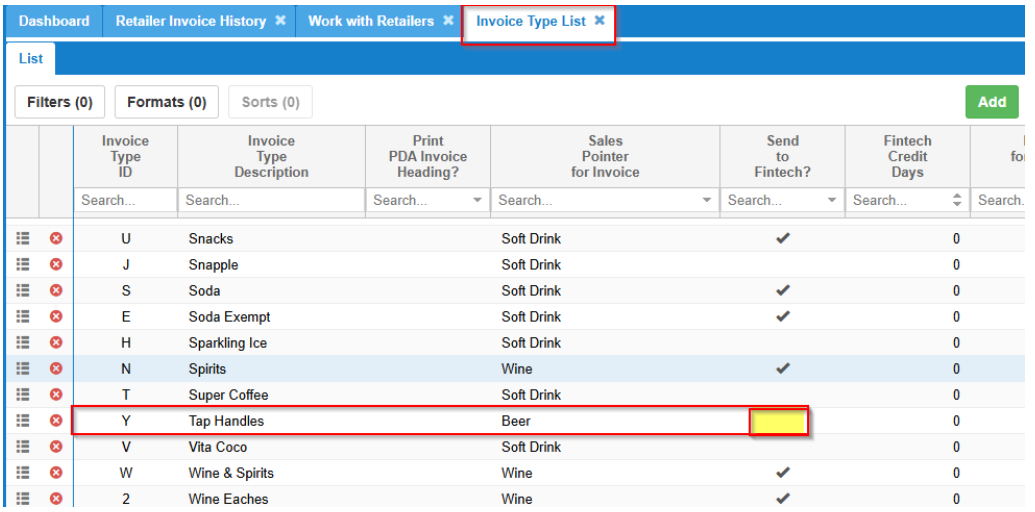
If you set this to Send to Fintech, then you'll be able to get the invoices sent to Fintech using FINTSLC2 .
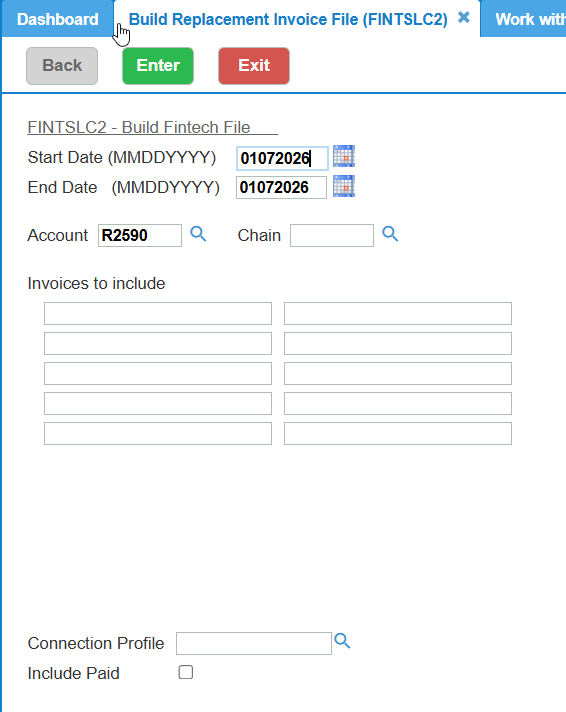
FINTSLC2 :
Use the dates of the invoices and the invoice number field options or Account number
This will send the invoice data to Fintech, once the invoice type is flagged to send to Fintech.
Important: Go back into the invoice type and uncheck the send to fintech box.
Was this article helpful?
That’s Great!
Thank you for your feedback
Sorry! We couldn't be helpful
Thank you for your feedback
Feedback sent
We appreciate your effort and will try to fix the article